
You’ve envisioned it: a warm evening, friends and family gathered, the scent of popcorn in the air, and a screen flickering with your favorite film. The backyard movie experience is a classic for a reason, and a portable projector is the key to unlocking it without breaking the bank. You’re looking for that sweet spot: a projector that delivers a good image, is easy to set up and move, and crucially, won’t cost you more than $500. This guide is designed to help you navigate the options and find the perfect projector for your outdoor cinematic adventures.
Before diving into specific models, it’s essential to establish what you actually need from your portable projector. This isn’t about the most features; it’s about the features that will genuinely enhance your backyard movie nights. Thinking critically about these points will help you filter out the noise and focus on devices that meet your practical requirements.
Viewing Environment Considerations
Your backyard isn’t a controlled dark room. You need to account for the ambient light, the size of your projection surface, and the typical distance you’ll be from the screen.
Ambient Light and Brightness (Lumens)
The biggest challenge for outdoor projection is ambient light. Even after sunset, there’s often residual light from streetlights or your house. This is measured in lumens. For backyard movies, you’ll generally want a projector with at least 500 ANSI lumens. Anything lower will struggle to produce a visible image once any light pollution exists. Aiming for 1000 ANSI lumens or more will give you a more robust image, especially if your movies start before it’s completely dark or if you’re in an area with significant light pollution. Be wary of projectors that advertise “light source lumens” or just “lumens” without the ANSI designation, as these figures are often inflated and don’t represent real-world brightness.
Projection Distance and Screen Size
The further the projector is from your screen, the larger the image will be. Most portable projectors have a throw ratio that dictates this. You need to measure the space where you plan to set up. Do you have 10 feet for a 100-inch screen, or are you limited to 6 feet? Check the projector’s specifications for its throw ratio and then consult its projection calculator or specification sheet to see what screen sizes it can achieve at different distances. You don’t want to buy a projector only to find out it can’t fill your desired screen from your available space.

- 【The Latest WIFI 6 Technology And Bluetooth 5.3】This projector with Wi-Fi and Bluetooth is equipped with the latest Wi-Fi 6 technology, compatible with Wi-Fi 6, 5G and 2.4G, offering faster connection speed and stronger stability, eliminating buffering and disconnection issues, and ensuring smoother online content playback. Additionally, it is fitted with the latest Bluetooth 5.3 chip, allowing for easy connection to Bluetooth speakers, headphones or other Bluetooth audio devices, providing a more efficient and stable transmission channel, and enabling users to enjoy higher audio quality with ease
- 【Built-in Streaming Media APP】Without any additional equipment,The YGSKK Wi-Fi projector supports streaming apps such as Prime Video, YouTube, and Hulu.The built-in applications allow you to easily enjoy a wide variety of movies, popular TV series and millions of other contents. Moreover, it also has an app store where you can download more applications. Whether it's a shared movie night or personal entertainment, this smart projector is very suitable
- 【Native 1080P High Definition,Compatible 4K】The native 1080P resolution presents you with clear and sharp full HD picture quality, with a brightness of up to 300 ANSI lumens, offering you images that are 50% brighter than those of similar projectors on the market. Whether you are watching movies, TV series, playing games or browsing photos, it will bring you astonishing clarity. Moreover, this movie projector is compatible with 4K, allowing you to enjoy the perfect experience of 4K picture quality. Note: Please ensure to connect 4K devices (such as TV sticks or USB drives) via HDMI to play 4K videos
- 【Wirelessly Connect to a Smart Phone, 50-200‘’ Large Screens】This is an amazing projector for iPhone. It is equipped with the "J-Share" setting, which enables wireless connection with smartphones. Both the phone and the projector need to be in the same network environment. Android phones need to download a program to connect, while iPhones do not need to download any applications (connect through the iPhone's screen mirroring function). In addition, this portable projector can project a large screen of 50 to 200 inches. You can adjust the screen size according to your personal preference to better enjoy the perfect experience of a large screen
- 【Strong Compatibility And Built-in Speakers】YGSKK projector for bedroom is equipped with three interfaces: HDMI, USB and audio (with an HDMI cable included). It is compatible with TV sticks, TV boxes, DVD players, laptops, USB flash drives, Switch/PS5, PC and other devices. The projector is built with high-fidelity stereo speakers, providing excellent and clear audio quality for an outstanding audio experience. It is also an excellent mini projector suitable for both indoor and outdoor activities

- 【Your Plug-and-Play Smart Cinema】It starts with the powerful Allwinner H726 chip and pure Android 14 for wireless freedom and direct access to hulu, YouTube and more with no extra sticks. The 135'' giant screen that pulls you into the immersive viewing experience. This is the smart projector that does it all
- 【Big Screen & Tiny Space】Our 0.9:1 ultra-short throw mini projector is made for bedrooms and small living rooms. Sits close to the wall (0.75m-2.65m), throws a huge 35-135” image. Effortlessly resize (80%-100%) without moving it. For the best 80”+ view, we recommend 1.6m
- 【4K Supported & Native 720P for Casual Use】Sharp enough for streaming. Bright enough for a bedroom or a backyard hangout. Simple enough for anyone. This portable projector is an affordable option for creating a basic home cinema experience. HD 720P | 4K Support | Total Freedom
- 【Portable Design & Universal Mounting】In seconds, you can swivel its lens 180° to project onto any surface. This mini proyector offers flexibility with ceiling mounting, table placement, tripod installation. Weighing only 0.77lb, it easily adapts to any space or occasion
- 【Vivid Detail & Built-In Sound】With 200 ANSI lumens brightness and an 8000:1 contrast ratio, this hy300 projector delivers clear, watchable images for movies, kids' shows, and gaming. The integrated 5W SoundBase Speaker provides rich audio, completing your experience—no external speakers needed
- A Roku account and internet connection are required for activation (Creating an account is free)
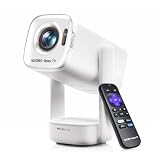
- Portable Roku TV Smart Projector: Meet the World's 1st Portable Roku TV Smart Projector with Roku TV built in. Just power on, connect to WiFi, and start streaming-no dongles, no switching inputs, no extra TV stick, and no extra remote needed. Enjoy top apps like Netflix, Prime Video, Hulu, YouTube, Roku Channel, and Apple TV. Enjoy 500+ TV channels with live news and weather, sports coverage, and more-totally free for bedroom viewing, living room movie nights, game day, soccer match nights, and backyard entertainment, home cinema, casual gaming, family gatherings, and party entertainment
- USB-C PD Power for Flexible Indoor and Outdoor Use: This portable projector supports 65W+ USB-C PD power input, so it can work with a compatible wall charger, laptop charger, power bank, or the Aurzen PowerBase Stand sold separately. Move it from the bedroom to the living room, use it as an outdoor projector for backyard movie nights, camping, and road trips, football match nights without being tied to one wall outlet. Note: Requires a 65W+ USB-C PD power source with 20V/3.25A output and a 5A E-Marker USB-C to USB-C cable
- Portable Gimbal Design, No Cable Interference: This small projector is built for real room-to-room use, with a smooth-damping gimbal stand that rotates fluidly and stays steady without sinking. Unlike side- or rear-powered projectors, D1R air uses a bottom power design that keeps cables out of the rotation path, reducing pulling, blocking, and setup hassle, so it's easier to place, adjust, and start watching in the bedroom, or project onto the ceiling or wall. Compact at 5.35 x 4.33 x 10.12 in and weighing only 1.18 kg (2.60 lb), it is easy to carry between rooms or take on the go.
- Independent Base Speakers, Dolby Audio & Useful Ports: Built-in dual 5W speakers are placed in the independent audio base instead of the projector body, creating a larger sound chamber for fuller sound, clearer dialogue, and reduced vibration. With Dolby Audio, dual-band WiFi (2.4G/5G), Bluetooth 5.2, and useful ports including HDMI, USB, Audio Out, and USB-C, this projector with WiFi and Bluetooth connects easily to laptops, game consoles, TV sticks, headphones, soundbars, and USB drives, making it a flexible projector for bedroom viewing, living room movies, sports streaming, and outdoor entertainment. Warm Tip: Fan noise at 1 m ranges from 29-35 dB by mode; steady fan sound is normal.


- A Roku account and internet connection are required for activation (Creating an account is free). Note: Power Supply: 100-240V AC, 50/60Hz.
- America's #1 TV Streaming Platform, All Top Apps: With Roku as your entertainment guide, exploring popular apps like NetfIix, Prime Video, Hulu, YouTube, Roku Channel—plus free movies, shows, and live TV—is as easy as it is fun. No dongles or extra remotes. Enjoy 500+ TV channels with live news and weather, sports coverage, and more—totally free.
- A Simple and Fast Home Screen: Enjoy a simple projector interface with intuitive navigation, quick search, and personalized recommendations. No-nonsense remote keep it effortless, while the Roku mobile app lets you control with your phone, type easily, or use voice commands.
- 1080P Full HD Resolution: Enjoy your favorite movies and TV shows in stunning high-definition picture quality for enhanced clarity and detail. This projector is perfect for creating a massive 60 to 150-inch screen for your home theater and outdoor movie nights.
- Auto Focus & Keystone Zero-Fuss: Advanced auto focus and auto keystone correction instantly adjust for a sharp, aligned screen-just place, power on, and enjoy a big screen without manual setup.

- A Roku account and internet connection are required for activation (Creating an account is free)
- Roku TV Smart Mini Projector | All Top Apps: No streaming sticks. No switching inputs. Simply connect to Wi-Fi and explore NetfIix, Prime Video, HuIu, YouTube, The Roku Channel, AppIe TV, and more—all from the easy-to-use Roku home screen. You'll also find live sports, plus plenty of free movies, shows, and live TV to enjoy. Powered by America's #1 TV streaming platform (based on hours streamed—Hypothesis Group, Dec. 2024), it makes your first smart projector experience simple from day one.
- Bigger, Richer Sound, Built into the Base: Big-screen entertainment deserves more than thin, undersized sound. That's why we built in a 3× larger sound chamber, delivering up to 2× the volume with fuller sound, clearer dialogue, and wider coverage. Movies feel more complete. Music fills the space better. And when you turn it up, the sound stays full and smooth—not harsh and strained.
- Mini Size, Light to Move | Plug-In Power: Grab the built-in strap and take it from the bedroom to the outdoor—or over to a friend's place. Under 1 lb keeps it light in hand, while the compact, rounded portable design looks right at home wherever it lands. Power Note: Requires a wall outlet and the included DC power cable. No built-in battery; USB-C power input is not supported.
- Clear Picture | 6 Modes, Tuned Your Way: Roku Smart Picture automatically matches the picture settings to what you're watching, or lets you choose from Movie, Sports, Vivid, Standard, and Low Power modes. Natural and balanced. Bright and colorful. More cinematic. With 6 picture modes, it's easy to find a clear, enjoyable look that fits both the content and your personal taste.

- 【Built-in WiFi & Bluetooth Projector with Apps】Dual-band WiFi 2.4G + 5G ensures fast and stable wireless streaming. Bluetooth 5.2 supports speakers and headphones. Built-in apps like YouTube and Prime Video are supported, and the projector is compatible with TV sticks (not included) to access a wide range of streaming content and enjoy massive video libraries, making it a perfect movie projector.
- 【HD Projection, Supports 4K Video Playback & Stereo Sound】Supports 4K video playback via USB drive for smooth viewing. High-quality optical lens delivers clear images and is scratch-resistant and easy to clean. Built-in stereo speakers provide clear sound for movies, TV shows, and casual gaming, ideal for use as a phone projector.
- 【Dynamic Starry Sky Mode & 180° Rotatable Design】Activate the dynamic Starry Sky Mode with one-touch control on the remote. Featuring 9 animated starry sky scenes and a built-in sleep timer, the projector for bedroom displays dynamic star patterns on the ceiling to create a calming bedtime atmosphere for kids. The 180° rotatable design lets you easily adjust the angle for wall or ceiling projection.
- 【Auto Keystone, Dual Focus & Big Screen Projection】Supports auto and manual focus for fast and precise image adjustment. Auto vertical keystone correction delivers a perfectly aligned image in seconds. The 0.9:1 short throw ratio enables big-screen projection in small spaces, supporting 30–200 inch screen sizes (recommended 40–100 inches).
- 【 Ultra-Portable Mini Projector for Indoor & Outdoor】Weighs only 0.77 lb (0.35 kg) with a compact size of 3.73 × 3.73 × 6.17 inches. Easy to carry in a backpack—perfect for camping, travel, dorm rooms, bedroom, outdoor movie nights, and small apartments.

- 🎃【270° Rotatable Stand for Wall & Ceiling Viewing】Designed with a built-in 270° rotatable stand, this mini projector makes it easy to project from different angles — including directly onto the ceiling for late-night movies, spooky movies, or relaxing bedroom viewing. Whether used as a bedroom projector or portable home projector, it helps create a flexible and comfortable entertainment setup for Halloween movie nights and cozy evenings
- 👻【Electric Focus & Keystone for Quick Image Adjustment】Skip the hassle of manual adjustment. The projector features electric focus and electric keystone correction, helping you quickly achieve a clearer and more properly aligned image. Combined with ±60° angle adjustment, it’s easy to adapt the viewing experience to different rooms and projection positions — perfect for setting up a spooky Halloween movie night, haunted house display, or seasonal entertainment space
- 🕸️【Short Throw Projection with Up to 200” Big Screen】Enjoy a large-screen movie experience even in smaller spaces. With short throw projection technology, this portable projector can display up to a 200-inch screen from a shorter distance, making it ideal for bedrooms, apartments, dorm rooms, or cozy home theater setups. Create an immersive Halloween movie night with scary movies, spooky scenes, or Halloween decorations on the big screen. Supports both 4:3 and 16:9 aspect ratios
- 💀【1080P Supported & 4K Compatible Viewing Experience】This HD movie projector supports 1080P resolution and 4K input compatibility, delivering bright and clear visuals for movies, shows, gaming, and everyday streaming. Perfect for casual home entertainment, family movie nights, outdoor projector setups, and Halloween parties featuring scary movies, spooky videos, or seasonal content
- 🧟♀️【Easy Wired Connection for iOS Devices】With simple USB connectivity, this projector for phone makes it easy to mirror content from compatible iOS devices onto a larger screen. Share photos, videos, apps, and entertainment more conveniently with family and friends. Enjoy Halloween movie nights, spooky videos, or Halloween party content on the big screen. (Note: Bluetooth and built-in apps are not supported.)

- 【WiFi6 & Bluetooth & Speaker Function】Portable projector with built-in WiFi6 & 5G & speaker. Faster transfer rates and lower transmission latency make it easy and fast to connect to smartphones, laptops, and more. Achieve fast and stable projection of videos, games, and more.
- 【180° Rotatable Mini Projector】Equipped with a 180-degree rotatable base bracket, this projector supports multi-direction projection from wall to ceiling, with projection size ranging from 35 to 130 inches.
- 【1080P HD Video Projection】Support 1080P/4K resolution, bring good visual effects. With advanced LED technology, the projection image is bright and lifelike. Compatible with both WiFi6 and 5G networks. With a 1500:1 contrast ratio, this projector delivers stunning visuals that ensure crisp details and vibrant colors.
- 【Long Lamp Lifespan】Built-in advanced fan cooling system reduces heat, extending the lamp service life up to 45,000 hours.
- 【Widely compatible projector】Portable projector built-in DC, AV, USB, 3.5mm headphone port, suitable for TV sticks/boxes, game consoles, laptops, PCs, smartphones, tablets, USB flash drives, etc. You can use it for home theater, parties, work, etc.
Essential Features for Backyard Use
Portability implies more than just size. It means ease of use and adaptability to an outdoor setting.
Connectivity Options
You’ll need ways to get your movie content onto the screen. HDMI is the standard for connecting laptops, streaming sticks (like Fire TV Stick, Roku, or Apple TV), and gaming consoles. USB ports are useful for playing media files directly from a flash drive or for powering some small streaming devices. Wi-Fi and Bluetooth are increasingly common and add convenience, allowing for wireless streaming from your phone or tablet and connecting wireless speakers. Consider what devices you’ll primarily use to play your movies and ensure the projector has the necessary ports and wireless capabilities.
Built-in Speakers vs. External Audio
The built-in speakers on most portable projectors are generally adequate for casual viewing in a quiet indoor setting, but they are usually lacking in volume and depth for an outdoor environment. Wind, background chatter, and the general expanse of a backyard means you’ll likely want to connect external speakers. Look for a projector with a 3.5mm audio output jack, which allows you to connect to soundbars, portable Bluetooth speakers, or even a more robust home audio system. Bluetooth connectivity for speakers is also a highly convenient option.
Power Source and Battery Life
Are you near an outdoor power outlet? If not, the projector needs a battery. Battery life is a critical factor for true portability. A projector with a 2-3 hour battery might suffice for a single movie, but if you plan on double features or extended viewing sessions, you’ll need to factor in charging time or a portable power bank. If you have access to power, you can often find projectors with slightly better performance for the same price, as manufacturers don’t have to invest as much in battery technology.
If you’re looking for the best portable projector for backyard movies under $500, you might find it helpful to check out a related article that discusses various options and features to consider when making your choice. This resource provides insights into the top models available in this price range, ensuring you can enjoy a cinematic experience right in your backyard. For more information, you can read the article here: Best Belays.Key Projector Specifications to Prioritize
Beyond the general needs, certain technical specifications directly influence the quality and usability of your projector. Understanding these will help you make informed comparisons.
Resolution and Image Quality
Resolution dictates the sharpness and detail of the image. For an enjoyable experience, you need to go beyond the very basic.
Native Resolution vs. Supported Resolution
This is a crucial distinction. A projector might support 1080p or even 4K resolution, meaning it can accept those signals, but its native resolution is what it actually displays. A projector with a native resolution of 480p (854×480) will produce a blurry, pixelated image, regardless of what signal you send it. For backyard movies, aim for a native resolution of at least 720p (1280×720). This will provide a reasonably sharp image that can be enjoyed on larger screen sizes. While 1080p native resolution is ideal, it’s often found in projectors over the $500 mark. Many projectors in your budget will offer 720p native resolution with 1080p support, which is a good compromise.
Contrast Ratio and Color Accuracy
Contrast ratio refers to the difference between the darkest blacks and brightest whites. A higher contrast ratio generally results in a more dynamic and vibrant image. Color accuracy ensures that the colors you see on screen are true to life. While these are harder to gauge without seeing a projector in action, reviews often mention if colors appear washed out or oversaturated. Look for projectors that mention support for various color gamuts or advanced color processing technologies, though they are less common in this price range.
Aspect Ratio and Keystone Correction
These features impact how your image is displayed and how easily you can set it up.
Standard Aspect Ratios (16:9, 4:3)
Most modern content is formatted in a 16:9 aspect ratio, which is a widescreen format. Movie aspect ratios can vary, but 16:9 is the most common for home use. Some older content or standard television broadcasts might be in a 4:3 aspect ratio. Ensure your projector handles the aspect ratios you intend to view without excessive black bars or distortion. Most portable projectors will default to 16:9.
Keystone Correction for Picture Alignment
Keystone correction is a lifesaver for outdoor setups. When you place your projector at an angle (e.g., on a table next to the screen, rather than directly in front), the image can appear trapezoidal. Keystone correction digitally adjusts the image to make it rectangular again. Vertical keystone correction is standard on most portable projectors and is usually sufficient. Automatic keystone correction is a nice convenience feature, but manual adjustment is perfectly functional. Be aware that excessive keystone correction can sometimes lead to a slight reduction in image sharpness.
Top Features to Look For Under $500

With the technical aspects understood, let’s focus on the features that make a portable projector truly suitable for backyard movie nights within your budget. These are the elements that contribute to convenience, durability, and an enjoyable viewing experience.
Brightness and Contrast for Outdoor Performance
This is where many budget projectors falter. You need sufficient brightness to combat ambient light and a reasonable contrast ratio for a watchable image.
Balanced Lumen Output
As mentioned earlier, prioritize ANSI lumens. A figure of 500-1000 ANSI lumens is the target. Don’t be swayed by inflated numbers that lack the ANSI certification. Readings from reputable tech reviewers can be invaluable here, as they test projectors under standardized conditions. If a projector claims 5000 lumens but reviews consistently mention it’s only good in complete darkness, treat that claim with skepticism.
Deep Blacks and Vibrant Colors
While deep blacks and perfect color accuracy are often aspirational in this price bracket, look for projectors that manage to produce a decent balance. A muddy black level will make dark scenes indistinguishable. Similarly, oversaturated or washed-out colors will detract from the viewing experience. Again, rely on reviews that offer comparative insights into image quality. Some projectors might have adjustable picture settings that allow for some calibration to improve color reproduction.
Connectivity and Smart Features
Modern convenience is key for a portable setup. You want to be able to connect your devices easily and potentially stream content wirelessly.
HDMI, USB, and Wireless Streaming
At least one HDMI port is non-negotiable for connecting external devices. USB ports are useful for direct media playback from thumb drives, which can simplify setup if you have your movies pre-loaded. Wi-Fi connectivity is a significant advantage, enabling you to stream directly from your smartphone or tablet using screen mirroring (such as Miracast or AirPlay) or apps that are built into the projector’s operating system if it’s a “smart” projector. Bluetooth is also a plus for wireless audio streaming to your preferred speakers.
Integrated Apps or Streaming Stick Compatibility
Some projectors come with their own limited operating systems and app stores, turning them into “smart” projectors. While these can be convenient, they are often slow or lack popular streaming apps. A more reliable approach is to use a dedicated streaming stick (like an Amazon Fire TV Stick, Roku, or Chromecast). Ensure the projector can easily power these devices via its USB port, or that it has sufficient HDMI input.
Sound and Audio Output
You’ll want to pair your projector with better audio for the full experience.
3.5mm Audio Jack for External Speakers
This is a basic but essential feature. A 3.5mm audio output jack allows you to plug in any standard auxiliary cable to connect to external speakers, soundbars, or even your home stereo system. This is almost always a better solution than relying on the projector’s built-in speakers.
Bluetooth Audio Connectivity
If the projector offers Bluetooth audio output, it simplifies connecting wireless speakers. This eliminates the need for cables and offers greater flexibility in speaker placement. Ensure the Bluetooth connection is stable and has minimal latency, as audio lag can ruin a movie.
Assessing Projector Lifespan and Durability

A portable projector for outdoor use needs to be reasonably robust and have a lamp that will last through many movie nights.
Lamp Life and Technology
The light source is a significant component of a projector’s lifespan and running cost.
LED vs. Traditional Lamps
Most portable projectors in this price range use LED light sources. LED lamps are known for their long lifespan, typically 20,000 to 50,000 hours, which translates to years of use without needing replacement. This is a stark contrast to traditional projector lamps that might last only 2,000-5,000 hours and are expensive to replace. For portability and longevity, LED is almost always the way to go.
Environmental Considerations
While LED is generally cooler, portable projectors still need adequate ventilation. Avoid blocking vents, especially if using indoors in a confined space or outdoors in humid conditions. Generally, the smaller the projector, the more critical proper airflow becomes.
Build Quality and Portability
How well is the projector constructed, and how easy is it to transport?
Compact and Lightweight Design
Portability means it should be easy to carry from indoors to outdoors, to a friend’s house, or on a camping trip. Look for projectors that are compact and lightweight. Many projectors come with carrying cases, which is an added bonus for protection and transport.
Sturdy Construction
While you’re not likely to be throwing it around, a projector built with decent materials will withstand being set up and packed away repeatedly. Metal or sturdy plastic construction is preferable. Check reviews for mentions of build quality and how well the projector holds up over time.
If you’re looking for the best portable projector for backyard movies under $500, you might also find it helpful to explore other home entertainment options. A recent article discusses the top five comforters in 2023, which can enhance your outdoor movie experience by providing warmth and comfort during those chilly evenings. For more details, check out the article here: top five comforters in 2023. This combination of a great projector and cozy blankets can make your backyard movie nights truly memorable.Setup and Ease of Use Within Reach
| Projector Model | Brightness (in lumens) | Resolution | Contrast Ratio | Throw Distance | Price |
|---|---|---|---|---|---|
| Anker Nebula Capsule II | 200 ANSI lumens | 720p | 600:1 | 3.08 – 10.1 ft | 469.99 |
| Vankyo Leisure 3 | 2400 lumens | 1080p | 2000:1 | 4.9 – 16.4 ft | 99.99 |
| ViewSonic M1 Mini | 120 lumens | 854×480 | 500:1 | 3.2 – 8.9 ft | 169.99 |
| Apeman M4 | 50-100 lumens | 854×480 | 1000:1 | 3.28 – 10.5 ft | 199.99 |
The dream of a backyard movie night can quickly sour if the setup process is complicated and time-consuming. Simplicity is key.
Initial Setup and Calibration
Getting the picture right should be straightforward.
Plug-and-Play Functionality
Most modern projectors are designed to be user-friendly. You should be able to plug in your source device, power on the projector, and have an image appear within minutes. Avoid projectors that require extensive driver installations or complicated configuration steps.
Manual vs. Automatic Adjustments
As mentioned earlier, keystone correction and focus adjustments are crucial. While manual focus rings and keystone wheels are standard, automatic focus and keystone correction can save you time and frustration. If opting for manual, ensure there’s a physical dial or lens that allows for precise adjustments.
Interface and Navigation
How easy is it to navigate the projector’s menus and settings?
Intuitive Menu System
If the projector has an on-screen menu, it should be logically organized and easy to understand. Test the remote control, too. Does it feel responsive? Are the buttons clearly labeled? A poorly designed interface can be a constant source of annoyance.
User Manual and Support
A clear and concise user manual can be invaluable, especially for troubleshooting. Check if the manufacturer provides online support or FAQs, which can be helpful for addressing common issues.
Beyond the Projector: Essential Accessories for Your Setup
The projector is the heart of your outdoor cinema, but you’ll need a few other items to complete the experience. These are generally readily available and don’t significantly add to the cost if you already own some.
The Screen: Your Canvas for Cinematic Magic
The surface you project onto is as important as the projector itself.
DIY Screen Options
You don’t need an expensive, dedicated screen. A smooth, white or light grey sheet stretched taut can work surprisingly well. The key is to minimize wrinkles and ensure it’s opaque enough to block light from behind. Avoid textured or colored fabrics.
Affordable Commercial Screens
There are many affordable pull-down or foldable projection screens available online for under $100. These offer a more consistent surface and are often easier to set up than a sheet. Look for simple, freestanding options or those that can be hung.
Audio Equipment: Hearing the Dialogue
As emphasized, built-in speakers are usually inadequate.
Portable Bluetooth Speakers
This is often the most convenient solution. Connect your projector via Bluetooth (if supported) or via a 3.5mm audio cable to a portable Bluetooth speaker. Many modern speakers offer impressive sound quality and battery life.
Wired Sound Systems
If you have a home stereo system or a soundbar with an auxiliary input, you can connect this for a more immersive audio experience. This might involve longer cables but can provide superior sound.
Content Delivery Devices
How will you actually play your movies?
Streaming Sticks (Fire TV, Roku, Chromecast)
These are compact, affordable, and offer access to virtually all streaming services. They typically draw power from the projector’s USB port or a separate power adapter.
Laptops and Tablets
Your laptop or tablet can serve as the source for your movies, connected via HDMI. This gives you access to locally stored files or streaming services through your device’s browser.
By carefully considering these aspects and prioritizing features that are most important for your backyard movie nights, you can find a fantastic portable projector for under $500. Remember to read reviews, compare specifications, and don’t be afraid to invest in a few key accessories to elevate your outdoor cinematic experience. The perfect movie night under the stars is well within reach.